


I had a situation where we’re using Firebase RTDB for a project and needed to display a paginated table of results, sorted by date with the newest items first. This is a fairly normal request, however with RTDB it’s a bit of a challenge given the unique cursor-based approach and somewhat sparse documentation. Additionally, not a single one of the 20+ sources I found online had code that actually achieved the desired result.
The Solution
After entirely too many hours of work, I present to you a functional solution to the pagination problem.
The approach assumes that we’re tracking a cursor record that in general is the first record of the next page (from the user’s perspective). This means when moving next the former page’s cursor is the first record of our results, and when moving previous (backward) the former page’s cursor is an entire page away from us. Also, the last page of results may not exactly match our page size (for example, 2 records on the last page with a page size of 3). This means that the location of the cursor relative to the end of the page changes for the last page.
Project Setup
You’ll need the following setup in your code for this to work:
private cursor = { val: 0, key: null }
private path = '' // The database path to query
private pageSize = 10 // Size for pagination
private page = 1 // Page number (start at 1)
private list = [] // Your data
// UI Helpers
private hasNext = false
private hasPrev = false

constructor(
  // I'm using Angular but you can use any SDK for this
  private db: AngularFireDatabase
) {}
Additionally, you’ll need to be sure to have an index so this code can be fast. This will look something like this:
"collectionName": {
  ".indexOn": ["date"],
  "$id": {
    ".read": "auth !== null"
  }
}
It’s very important that the index is at the collection level, not the document level.
Initial Query (for populating the first page)
To better illustrate the previous explanation, we have an array of values from 1 to 17 representing increasing dates (1 is the oldest, 17 is the most recent). Because of this our next and previous arrows are backward from what we would expect in a UI. We're taking pages from right (newest) to left (oldest) and marking a cursor for calculation of subsequent pages.
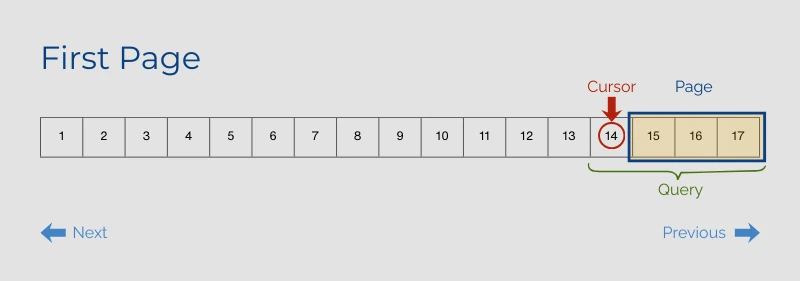
We run the query using limitToLast because we want the results at the end of the list, not the beginning, since we want recent records first. Despite this, we also have to reverse() the returned results so that the newest items will show at the top instead of the bottom.
async firstPage() {
  const snapshot$ = this.db.list(this.path, ref =>
    ref.orderByChild('date').limitToLast(this.pageSize + 1)
  ).snapshotChanges()
  const snapshot = await firstValueFrom(snapshot$)
  this.cursor = { val: snapshot[0].payload.val().date, key: snapshot[0].key }
  const _list = snapshot.map(snap => snap.payload.val()).reverse()
  if(_list.length > this.pageSize) {
    _list.pop()
    this.hasNext = true
  }
  this.list = _list
}
Note that we saved the cursor before reversing the order of the list. Also, we’re intentionally querying an extra record for UX reasons, so that we can know if there will be another page of results after this one. Assuming we returned more than a full page of results, we pop off the extra record and update the hasNext indicator.
Moving Next
To move to the next page of results, you’re actually moving backward through the data as sorted by the index. This means we’re ending our query at the first page of results (rather than starting from that page), which is counter-intuitive. The following image uses dotted outlines to show where we had been, solid outlines to indicate the new state, and arrows to show the movement of the cursor.
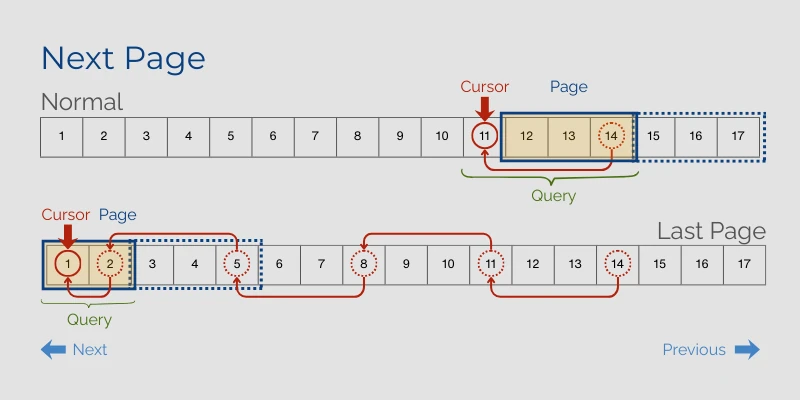
As you can see, the last page is a bit unique as it's the only page to contain the cursor as part of the data, and also to include fewer items than the page size (this is more common than not in paginated lists). We make this work with the following code.
async next() {
  if(!this.hasNext) return // Shortcut
  this.page++
  this.hasPrev = true // Since we're moving forward

  const snapshot$ = this.db.list(this.path, ref =>
    ref.orderByChild('date')
       .endAt(this.cursor.val, this.cursor.key) // MAGIC
       .limitToLast(this.pageSize + 1)
  ).snapshotChanges()
  const snapshot = await firstValueFrom(snapshot$)
  this.cursor = { val: snapshot[0].payload.val().date, key: snapshot[0].key }
  const _list = snapshot.map(snap => snap.payload.val()).reverse()
  if(_list.length > this.pageSize) {
    _list.pop()
    this.hasNext = true
  } else {
    this.hasNext = false
  }
  this.list = _list
}
You’ll notice that this is very similar to the first() function but it has two additional requirements:
- We have to add the
endAtto progress to the next page of results - We need to be sure to set
hasNext = falseif we’re at the end of the result set
Moving Previous
To move backward, we really throw things on their head. First, we need to hold on to the number of items in the former page so that we can account for the possibility that we were on the last page of results and it wasn’t a full page (fewer results than our page size). We also have to reverse direction in relation to our cursor, and fetch the former page of results again along with the new page of results.
NOTE: This is the trick I found that actually works for moving backwards. I haven't been able to find this technique published anywhere else.
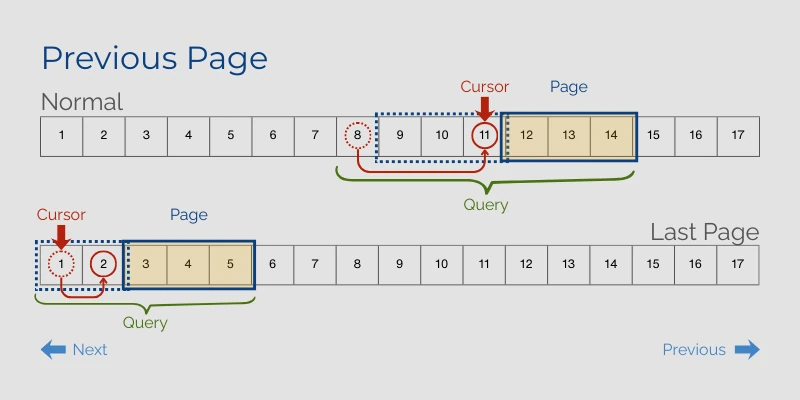
This diagram helps illustrate why we need to capture more records when moving previous. We always need to include the prior cursor, the new cursor, and the page of results we want to display.
NOTE: We could reduce the extra records by tracking separate cursors for next/previous but in practice I found this was harder to understand without improving the code at all. Because navigation forward through a list is more common than backward, and the prior page of results are likely to be cached, this shouldn't have significant performance implications.
The actual code behind this concept does a bit of extra math to remove the results we're returning but not displaying, and to account for the last page being smaller than a full page.
async prev() {
  if(!this.hasPrev) return // Shortcut
  this.page--
  this.hasPrev = this.page > 1
  const _lastPageSize = this.list.length

  const snapshot$ = this.db.list(this.path, ref =>
    ref.orderByChild('date')
       .startAt(this.cursor.val, this.cursor.key) // MAGIC
       .limitToFirst(this.pageSize + _lastPageSize + 1) // LOOK
  ).snapshotChanges()
  const snapshot = await firstValueFrom(snapshot$)
  const _list = snapshot.map(snap => (snap => ({...snap.payload.val(), key: snap.key})).reverse()
  // Substract 1 if the last page wasn't a full page
  const excessRecords = _lastPageSize - (_lastPageSize < this.pageSize ? 1 : 0)
  _list.splice(-excessRecords, excessRecords) // Remove the extra results
  this.cursor = { val: _list[_list.length-1].date, key: _list[_list.length-1].key }
  _list.pop() // Remove our cursor record
  this.query.hasNext = true
  this.list = _list
}
Because we’re reversing direction we use startAt and limitToFirst. We have to be sure to remove the previous page of results from our list, but also account for the cursor record. The cursor is NOT inside our desired results for this page, but if the page we just navigated away from was a partial page then the cursor was within the list of results for that page. We need to be sure not to remove the cursor from results until after we’ve saved it for future use.
User Interface
With this implementation you can do a few UI niceties:
- Display the current page number
- Disable Previous / Next buttons if it’s not possible to move in that direction
- Display the page size
Of course, you can’t display the total number of pages with this approach as we don’t have that information, and you also can’t easily allow them to change page size without resetting back to the beginning.
I hope you find this breakdown helpful. If you have an actual, working example that is simpler than this I would love to hear about it. If this solves a problem for you, I would love to hear that too!